
Comparisons
Boox Picco vs IKAWE Moov: specs, price, release date and which to buy
Boox Picco vs IKAWE Moov compared: price, release date, screen size and sharpness, buttons, software, PDFs, magnets and water resistance, and which pocket reader to buy.
By IKAWE · Published · 8 min read
Written by IKAWE, the maker of Moov. Moov specifications are IKAWE's own. We haven't tested the Boox Picco hands-on: its specifications come from Boox's product page and the hands-on reports listed under Sources, checked on 19 October 2026. Screen-area and pixel figures are our calculations from published numbers.
Key takeaways
- The Boox Picco is a 3.97-inch, 235 PPI pocket e-reader with a warm/cool front light, touch, buttons and USB-C, at about 58 g. It costs $109.99 (US warehouse) or $99.99 (Hong Kong) and ships around November 2026.
- IKAWE Moov has a larger 4.5-inch screen, about 24% more area, at 219 PPI (Lite, $99) or 300 PPI (Pro, $129), and weighs 75 g.
- The Picco is smaller and lighter. Moov has the bigger screen, left and right page-turn buttons and a built-in magnetic back, and it supports PDFs, which the Picco doesn't. Moov Pro adds 300 PPI and IPX8 water resistance.
- Software is the biggest difference: the Picco runs Boox's own closed system, with books added through Boox's Tiles app or website and no PDF support. Moov runs the open-source CrossPoint, with USB-C file transfer and the IKAWE companion app.
In this article
- The Boox Picco at a glance
- Boox Picco vs IKAWE Moov: specs side by side
- Size and weight: the Picco is smaller
- Screen: bigger on Moov, and sharper on Moov Pro
- Buttons and controls
- Software and getting books on
- Battery, charging and storage
- Magnets and phone fit
- Water resistance
- Pros and cons
- Which should you buy?
- Frequently asked questions
- Sources
The Boox Picco at a glance
Boox announced the Picco at IFA in early September 2026 and opened preorders on 15 September. The first batch sold out almost immediately. Here's what Boox lists:
- Screen: 3.97-inch e-ink touchscreen, 480 × 800, 235 PPI
- Light: warm/cool front light
- Buttons: power, a page-turn button and a function switch for the light or dark mode
- Battery and charging: 920 mAh, USB-C
- Storage: 16 GB microSD card included, expandable to 2 TB
- Connectivity: Wi-Fi and Bluetooth
- Size and weight: 105.5 × 62 × 5.5 mm, about 58 g
- Books: EPUB, MOBI, AZW3, FB2, TXT, RTF, HTML and more, added through Boox's Tiles app or website. No PDF.
- Extras: Pomodoro timer, to-do list and countdown apps; the screen rotates four ways
- Price and release: $109.99 from Boox's US warehouse or $99.99 from Hong Kong, shipping around November 2026
Hands-on reports were positive about the size: Android Police was "honestly impressed", and How-To Geek said it "feels great to hold", though navigation on the IFA prototype was slow.
Boox Picco vs IKAWE Moov: specs side by side
| Spec | Boox Picco | Moov Lite | Moov Pro |
|---|---|---|---|
| Price | $99.99–109.99 | $99 | $129 |
| Screen | 3.97-inch, 235 PPI | 4.5-inch, 219 PPI | 4.5-inch, 300 PPI |
| Front light | Yes, warm/cool | Yes, warm/cool | Yes, warm/cool |
| Controls | Touch, page-turn button, function switch | Touch, left and right page-turn buttons | Touch, left and right page-turn buttons |
| Size | 105.5 × 62 × 5.5 mm | 110 × 66 × 6 mm | 110 × 66 × 6 mm |
| Weight | About 58 g | 75 g | 75 g |
| Battery | 920 mAh | 1,100 mAh | 1,100 mAh |
| Charging | USB-C | USB-C | USB-C |
| Storage | 16 GB microSD, up to 2 TB | 16 GB microSD, up to 256 GB | 16 GB microSD, up to 256 GB |
| Software | Boox's own system | CrossPoint (open source) | CrossPoint (open source) |
| Formats | EPUB, MOBI, AZW3, FB2, TXT and more; no PDF | EPUB, MOBI, TXT and PDF | EPUB, MOBI, TXT and PDF |
| No | Yes | Yes, with enhanced reflow | |
| Magnets | Only with the $12.99 case | Built in | Built in |
| Water resistance | No rating | No rating | IPX8 |
Size and weight: the Picco is smaller
This is the Picco's biggest advantage. At about 58 g and 105.5 × 62 × 5.5 mm, it's one of the two lightest e-readers around, alongside the Xteink X3. Moov is 17 g heavier and 4.5 mm taller, at 75 g and 110 × 66 × 6 mm.
Both disappear into a jacket pocket. If every gram and millimetre matters, the Picco wins; if you'd trade a little size for a bigger page, read on.
- Boox Picco58 g
- IKAWE Moov75 g
- Xteink X4 Pro (for reference)72 g
Screen: bigger on Moov, and sharper on Moov Pro
Moov's 4.5-inch screen has about 24% more area than the Picco's 3.97-inch one. At the same font size, that's roughly a quarter more text on each page, so fewer page turns.
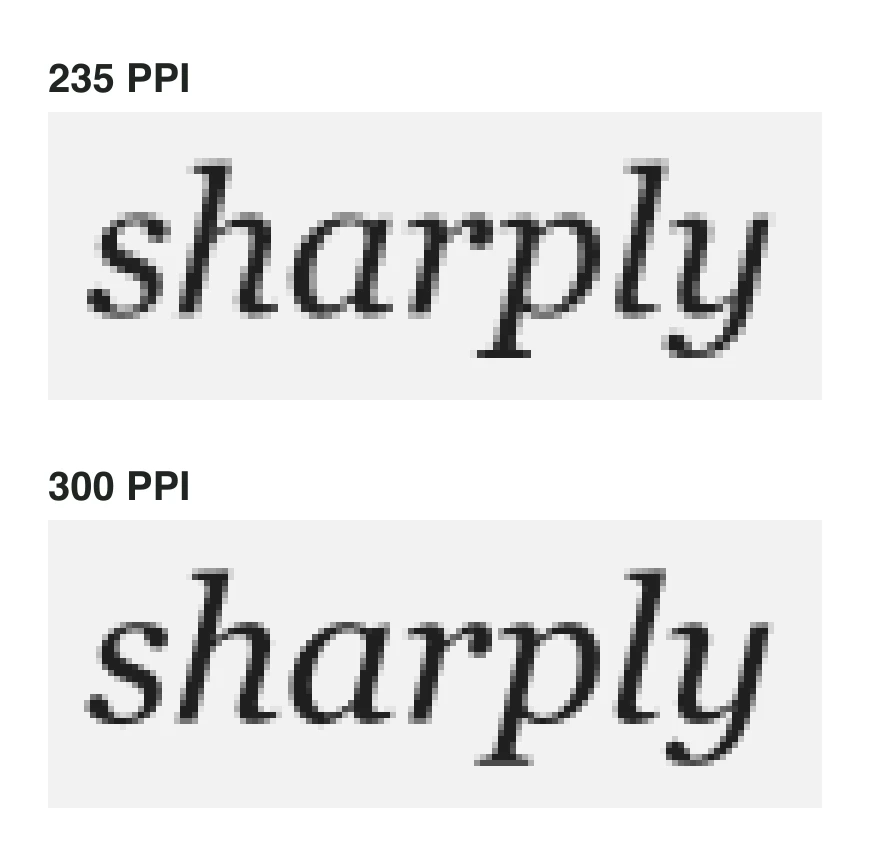
On sharpness, the Picco's 235 PPI sits between Moov Lite (219 PPI) and Moov Pro (300 PPI). Moov Pro has the sharpest screen of any pocket e-reader we know of: on 8-point text, it uses about 33 pixels for each line of type, against 26 on the Picco.
- IKAWE Moov8.62 sq in
- Boox Picco6.95 sq in
Calculated from each screen's active area: Moov's published dimensions; the Picco's 480 × 800 pixels at 235 PPI.
Both have warm/cool front lights, so both work for reading in bed. Neither has been independently measured for brightness range yet.
Buttons and controls
Both pair a touchscreen with physical buttons, but differently. The Picco has a page-turn button, a power button and a function switch that toggles the front light or dark mode. Moov has two page-turn buttons, on the left and right sides, plus power, so you can turn pages one-handed in either hand.
Software and getting books on
This is where the two differ most.
The Picco runs Boox's own system, not Android, so it can't install apps such as Kindle or Libby. Books go on through Boox's Tiles app or website. The eBook Reader called this "a serious sticking point". It reads a wide range of DRM-free e-book formats, including MOBI, AZW3 and FB2 as well as EPUB, but not PDF. Boox hasn't said what the software is built on; readme.club reports that it's based on an early version of the open-source CrossPoint firmware, which Boox hasn't confirmed.
Moov runs CrossPoint out of the box, with over-the-air updates. You can copy books over USB-C, upload them over Wi-Fi from a browser, send them from Calibre or an OPDS catalogue, or share them from the IKAWE companion app. It supports DRM-free EPUB, MOBI, TXT and PDF, and Moov Pro adds enhanced PDF reflow.
Neither reads DRM-protected Kindle purchases or Libby loans. For those, see our guide to Xteink alternatives, which covers Android and Libby-ready readers.
Battery, charging and storage
Both charge over USB-C, a relief after Xteink's pogo pins. Moov's 1,100 mAh battery is about 20% larger than the Picco's 920 mAh. Both store books on a 16 GB microSD card that comes in the box; the Picco accepts cards up to 2 TB, Moov up to 256 GB, which is still room for tens of thousands of novels.
Magnets and phone fit
Moov's back is magnetic, so it attaches to MagSafe-style phone cases and metal surfaces, and two adhesive metal rings come in the box. The Picco itself has no magnets; Boox sells a $12.99 magnetic case with a built-in ring.
Width decides how well a reader sits on a phone. The Picco is 62 mm wide and Moov 66 mm; both are narrower than most phones.
Water resistance
Moov Pro is rated IPX8 for immersion, so a drop in the bath or the pool isn't fatal. Boox lists no water-resistance rating for the Picco, and neither does Moov Lite. More in our guide to water ratings.
Pros and cons
Boox Picco
Pros
- Smaller and lighter: about 58 g
- Warm/cool light, touch and USB-C
- Reads MOBI, AZW3 and FB2 as well as EPUB
- microSD up to 2 TB
Cons
- Smaller 3.97-inch screen
- No PDFs; books go on through Boox's app or website
- Magnets only with a $12.99 case
- Ships around November
IKAWE Moov
Pros
- About 24% more screen area
- 300 PPI on Moov Pro
- Left and right page-turn buttons
- CrossPoint, USB-C file transfer, PDF support and built-in magnets; IPX8 on Pro
- Companion app for sending books from your phone
Cons
- 17 g heavier and slightly larger
Which should you buy?
Frequently asked questions
When does the Boox Picco ship?
Boox's store says preorders ship around November 2026. Preorders opened on 15 September, and the first batch sold out quickly.
How much does the Boox Picco cost?
$109.99 from Boox's US warehouse or $99.99 from its Hong Kong warehouse. The optional magnetic case is $12.99.
Does the Boox Picco have page-turn buttons?
Yes: a page-turn button, a power button and a function switch for the light or dark mode, plus a touchscreen.
Does the Boox Picco support PDF?
No. Boox lists EPUB, MOBI, AZW3, FB2, TXT and other e-book formats, but not PDF. Moov supports PDFs, and Moov Pro adds enhanced reflow.
Is the Boox Picco Android?
No. It runs Boox's own system, so it can't install Android apps such as Kindle or Libby.
Is the Boox Picco magnetic?
Not by itself. Boox sells a $12.99 case with a built-in magnetic ring. IKAWE Moov has a magnetic back built in.
Which is smaller, the Boox Picco or IKAWE Moov?
The Picco: about 58 g and 105.5 × 62 × 5.5 mm, against Moov's 75 g and 110 × 66 × 6 mm. Moov has the larger 4.5-inch screen.
Boox Picco vs Xteink X4 Pro: which is better?
The Picco is smaller and lighter (about 58 g against 72 g) and charges over USB-C instead of pogo pins, with a slightly sharper 235 PPI screen. The X4 Pro has a larger 4.3-inch screen, is shipping now, and is officially supported by CrossPoint.
What's the best Boox Picco alternative?
IKAWE Moov for a bigger, sharper (on Pro) screen with open-source software, or the Xteink X4 Pro if you want something you can buy today. See our Xteink X4 Pro alternatives guide for more.
Sources
- Boox Picco product page
- Boox Picco Magnetic Case
- Android Police: Boox's tiny e-reader is now available to buy (16 Sep 2026)
- Android Police: hands-on with the Boox Picco (4 Sep 2026)
- How-To Geek: Boox Picco hands-on (5 Sep 2026)
- The eBook Reader: New Boox Picco appears overly limited and restricted (16 Sep 2026)
- Good e-Reader: Boox Picco available as a preorder
- readme.club: Boox Picco is running CrossPoint (Sep 2026)
- The eBook Reader: Boox Picco
- IKAWE Moov Lite and Moov Pro
- CrossPoint Reader on GitHub
- Xteink X4 Pro product page
Specifications and prices checked on October 19, 2026. Products change; check the maker’s page before buying.
Keep reading
Buying guides
The best Xteink X4 Pro alternatives in 2026, by what you want to fixGuides
300 PPI e-readers explained: why sharpness matters most on a small screenBuying guides
The smallest e-readers with a front light in 2026Buying guides
Best pocket-sized e-readers in 2026: every mini e-reader compared