Guides
300 PPI e-readers explained: why sharpness matters most on a small screen
What 300 PPI means on an e-reader, why sharpness matters more on a small screen held close, every 300 PPI e-reader compared, and the first pocket-sized one.
By IKAWE · Published · 10 min read
Written by IKAWE, the maker of Moov. Moov specifications are IKAWE's own; other devices' figures come from makers' pages and the sources listed, checked on 19 October 2026. Pixel and distance figures are our calculations from those numbers, and the text image is a simulation, not a photo of a device.
Key takeaways
- PPI (pixels per inch) is how finely a screen draws text. At 300 PPI, each pixel is about 0.085 mm across, small enough that letters look printed rather than drawn.
- Sharpness matters more on a small screen, not less. People hold phone-sized screens closer, about 29 cm when reading a novel in one study, and at that distance normal vision resolves detail right up to about 300 PPI.
- 300 PPI lets you choose a smaller font without losing clarity, so a pocket screen fits more words per page and you turn pages less often.
- Every other 300 PPI e-reader we know of is phone-sized or larger, from the 5.84-inch PocketBook Q up. IKAWE Moov Pro is the first pocket-sized e-reader with a 300 PPI screen that we can find, at 4.5 inches.
In this article
- What PPI means on an e-reader
- See the difference
- Why small screens need more sharpness, not less
- What 300 PPI does for reading
- Pixels per letter, reader by reader
- Every 300 PPI e-reader, compared
- Moov Pro: the first pocket-sized 300 PPI e-reader
- When 300 PPI matters less
- The bottom line
- Frequently asked questions
- Sources
What PPI means on an e-reader
PPI stands for pixels per inch: how many pixels fit along one inch of screen. A higher number means smaller pixels, packed more tightly, so letters are built from finer pieces. It's a fixed property of the screen, set when the panel is made.
- At 219 PPI, each pixel is about 0.116 mm across.
- At 300 PPI, each pixel is about 0.085 mm across, and a square inch holds 90,000 pixels, against about 48,000 at 219 PPI.
- Most e-ink screens show 16 shades of grey. They use the in-between greys to smooth the edges of letters (anti-aliasing), so lower-PPI text looks soft rather than jagged.
PPI isn't the same as screen size or resolution. A 6-inch Kindle and a 4.5-inch Moov Pro both have 300 PPI screens: the Kindle has more pixels in total because its screen is bigger, but each letter is drawn equally finely on both.
See the difference
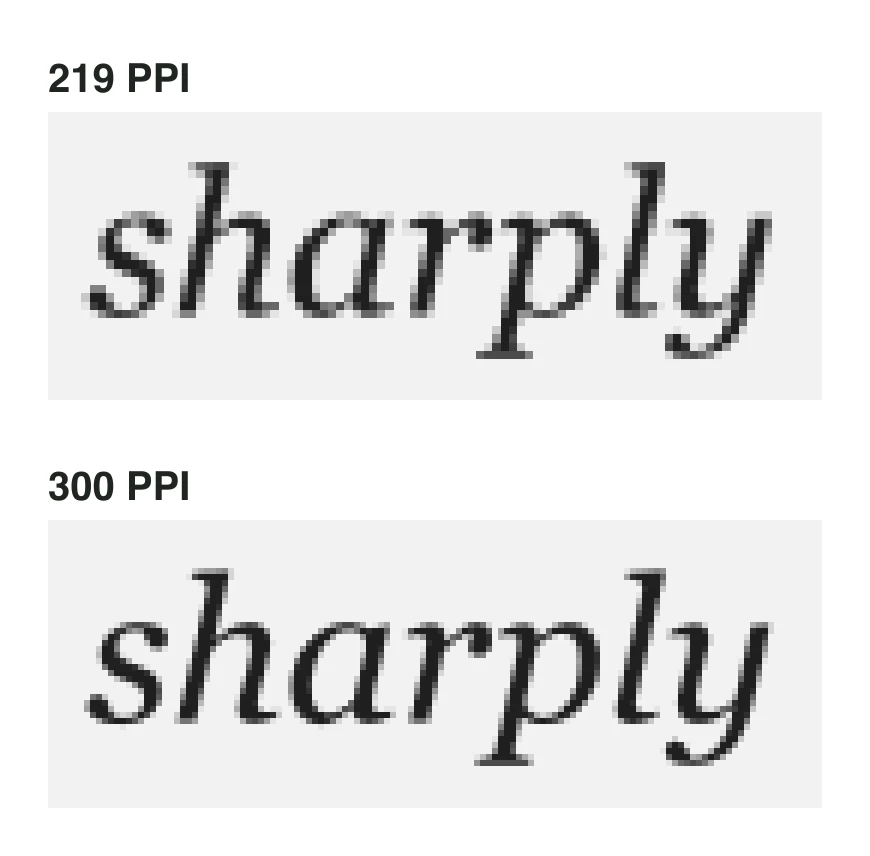
At normal reading distance you won't see individual pixels at either density. What you notice is the overall impression: at 219 PPI, small text has slightly soft, fuzzy edges and curves look a little stepped; at 300 PPI, the same text looks crisp and evenly inked, closer to a printed page. The smaller the text, the bigger the difference, because each letter has fewer pixels to work with.
Why small screens need more sharpness, not less
It's tempting to think a small screen needs fewer pixels. The opposite is true, because of how close you hold it.
People hold small screens closer than books. In a 2011 study, people held their phones about 32 cm away to read web pages and 36 cm for text messages, closer than the typical 40 cm for printed text (Bababekova et al.). In a 2017 study of reading a novel on a smartphone for an hour, the average was 29 cm, creeping closer as people read on (Long et al.). A pocket e-reader is held the same way, in one hand, close to your face.
The closer the screen, the finer the detail your eyes can pick out. Normal 20/20 vision resolves detail about one minute of arc across (visual acuity). Turning that into pixels per inch:
| Viewing distance | Where it comes from | PPI at the limit of 20/20 vision |
|---|---|---|
| 29 cm | Reading a novel on a phone (Long et al. 2017) | About 300 PPI |
| 32 cm | Reading web pages on a phone (Bababekova et al. 2011) | About 270 PPI |
| 36 cm | Reading text messages (Bababekova et al. 2011) | About 240 PPI |
| 40 cm | Typical distance for a printed book | About 220 PPI |
Put the other way round: 219 PPI only reaches the limit of normal vision at about 40 cm, the distance you'd hold a book. 300 PPI reaches it at about 29 cm, the distance people actually hold a phone-sized screen. That's why a pocket reader, held close, benefits from 300 PPI at least as much as a larger reader.
Acuity isn't a hard wall: many people see better than 20/20, especially when young, and our eyes are sensitive to edge quality beyond the point where single pixels disappear. We haven't found a study of e-reader viewing distance specifically; pocket readers are held like phones, so the phone studies are the closest guide.
What 300 PPI does for reading
Small text stays crisp. On a pocket screen, font size is a trade-off between comfort and how much fits on a page. A sharper screen moves that trade-off: you can read a size smaller without the text turning soft. Dropping from 10 to 8 point fits about 56% more text on each page, so you turn pages less often.
Letters look the way they were designed. The contrast between thick and thin strokes in serif fonts, the slant of italics and the fine hairlines of elegant typefaces survive at 300 PPI. At lower densities they're the first details to blur, which is why many readers stick to heavier fonts on low-PPI screens.
Accents and complex scripts stay legible. Diacritics (é, ñ, ü), and the many strokes of Chinese, Japanese and Korean characters, need pixels to stay distinct at small sizes. Viwoods points out that this makes multilingual reading noticeably cleaner at 300 PPI.
The small stuff gets readable. Footnotes, superscripts, page numbers, chapter headings, table text and the labels in menus all sit below your main font size, where low PPI hurts most.
Images and PDFs keep their detail. Covers, maps, diagrams, comics and the fixed pages of PDFs all carry fine lines that need small pixels. On a small screen, a PDF page shown whole has tiny text, so every extra pixel counts.
A sharper screen won't cure eye strain on its own. Lighting, font size, contrast and how long you read matter more. But crisp, well-formed letters are easier to read, and most people find them more comfortable over a long session.
Pixels per letter, reader by reader
Because a font size describes a physical height, you can count how many pixels each screen spends on a line of type. Here's the em (the height a font size describes) of 8-point text, a common small setting on a pocket reader:
- IKAWE Moov Pro (300 PPI)33.3 px
- Kindle, Kobo Clara BW (300 PPI)33.3 px
- Xiaomi InkPalm 5 (284 PPI)31.6 px
- Xteink X3 (259 PPI)28.8 px
- Boox Picco (235 PPI)26.1 px
- IKAWE Moov Lite (219 PPI)24.3 px
- Xteink X4 Pro (219 PPI)24.3 px
Calculated as 8 ÷ 72 × PPI.
Moov Pro draws 8-point text with the same detail as a 6-inch Kindle or Kobo, in a screen you can carry in a jeans pocket.
Every 300 PPI e-reader, compared
| Reader | Screen | PPI | Price and status |
|---|---|---|---|
| IKAWE Moov Pro | 4.5-inch | 300 | $129 |
| PocketBook Q | 5.84-inch | 300 | Announced, €199, expected late 2026 |
| Kindle (2026) | 6-inch | 300 | $149.99 |
| Kobo Clara BW | 6-inch | 300 | $159.99 |
| Boox Palma 2 | 6.13-inch | 300 | $269.99 |
| Boox Palma 3 | 6.13-inch | 300 | $339.99, coming soon |
| Viwoods AiPaper Reader | 6.13-inch | 300 | $279 |
| Kindle Paperwhite (2026) | 7-inch | 300 | Ships 28 October 2026 |
| Kobo Libra Colour | 7-inch | 300 (black and white), 150 (colour) | On sale |
Weight follows size: Moov Pro weighs 75 g, against 130 g for the PocketBook Q, 170 g for the Boox Palma 2 and 174 g for the Kobo Clara BW.
- IKAWE Moov Pro4.5 inches
- PocketBook Q5.84 inches
- Kindle (2026)6 inches
- Kobo Clara BW6 inches
- Boox Palma 2 and 36.13 inches
- Kindle Paperwhite7 inches
Lower is better here only if you want the most portable reader.
Moov Pro: the first pocket-sized 300 PPI e-reader
IKAWE Moov Pro puts a 300 PPI, 4.5-inch e-ink touchscreen (about 680 × 1,136 pixels) in a 110 × 66 × 6 mm, 75 g body. That's twice the pixels of the 4.3-inch, 219 PPI screen on the Xteink X4 Pro, in a body with a slightly smaller footprint.
As far as we can find, it's the first e-reader under 5 inches with a 300 PPI screen. We checked every pocket reader sold or announced in 2026, Wikipedia's comparison of e-readers and older small readers. The closest we found was the 5.2-inch Xiaomi InkPalm 5 at 284 PPI (Good e-Reader); the 5-inch readers of the early 2010s, such as the Kobo Mini, were about 200 PPI. If we've missed one, tell us and we'll correct this.
- Screen: 4.5-inch e-ink touchscreen, 300 PPI, warm/cool front light
- Controls: touch plus left and right page-turn buttons
- Water: rated IPX8
- Reading: CrossPoint firmware, with enhanced PDF reflow and text formatting
- Charging and storage: USB-C, 1,100 mAh battery, 16 GB microSD card (up to 256 GB)
- Price: $129. Moov Lite, with a 219 PPI screen, is $99
When 300 PPI matters less
- Large fonts: at 14 point and above, letters have enough pixels at 219 PPI to look clean. If you read big, the difference is small.
- Arm's length: if you hold your reader far away, as with a book on a table, 219 to 240 PPI already reaches the limit of normal vision.
- Other parts of the screen: contrast, how evenly the front light spreads, and how well the software renders fonts all affect how sharp text looks. A well-rendered 219 PPI screen can look better than a badly rendered sharper one.
- Colour e-ink: colour screens reach 300 PPI only in black and white; colour detail is half that.
The bottom line
Frequently asked questions
What does 300 PPI mean on an e-reader?
The screen fits 300 pixels along each inch, so each pixel is about 0.085 mm across. It's the same density as the Kindle and Kobo Clara BW, and fine enough that text looks printed at normal reading distances.
Is 300 PPI good for an e-reader?
Yes. 300 PPI is the standard for sharp e-ink text. It reaches the limit of 20/20 vision at about 29 cm, the distance people hold small screens, so pixels effectively disappear.
What is the smallest 300 PPI e-reader?
IKAWE Moov Pro, with a 4.5-inch, 300 PPI screen. As far as we can find, it's the first e-reader under 5 inches with a 300 PPI screen; the next smallest are the 5.84-inch PocketBook Q (announced) and 6-inch readers such as the Kindle and Kobo Clara BW.
Can you see the difference between 219 and 300 PPI?
Yes, mostly with small text. At 300 PPI, curves, italics and thin strokes look smoother and edges crisper. At large font sizes the difference is much smaller.
Does 300 PPI reduce eye strain?
Not on its own: lighting, font size, contrast and reading time matter more. But crisp text is easier to read, and most people find it more comfortable over long sessions.
What PPI is the Xteink X4 Pro?
219 PPI on a 4.3-inch screen, the same as the X4 Classic. The Xteink X3 is 259 PPI and the Boox Picco 235 PPI.
Do all Kindles have 300 PPI screens?
Current Kindles do: the 6-inch Kindle, the 7-inch Paperwhite and the Colorsoft (in black and white) are all 300 PPI.
Is PPI the same as resolution?
No. Resolution is the total number of pixels; PPI is how densely they're packed. A bigger screen needs more pixels to reach the same PPI. Moov Pro is about 680 × 1,136 pixels on 4.5 inches; the 6-inch Kindle (2024) is 1,072 × 1,448.
Why does PPI matter more on a small e-reader?
Because you hold it closer and tend to choose smaller fonts to fit more on each page. Both make each pixel count for more.
Sources
- Viwoods: 300 PPI E Ink explained
- Bababekova et al. (2011): Font size and viewing distance of handheld smart phones, Optometry and Vision Science
- Long et al. (2017): Viewing distance and eyestrain symptoms with prolonged viewing of smartphones, Clinical and Experimental Optometry
- Wikipedia: Visual acuity
- Wikipedia: Comparison of e-readers
- Good e-Reader: Xiaomi InkPalm 5 hands-on review
- CNX Software: InkPalm Plus e-reader with a 5.84-inch display (25 May 2022)
- Amazon: Kindle (2024) specifications
- TechRepublic: 2026 Kindle lineup and prices
- Amazon: Kindle Paperwhite (2026)
- Kobo Clara BW specifications
- Kobo Libra Colour specifications
- Boox Palma 2 product page
- Boox Palma 3 product page
- Viwoods AiPaper Reader product page
- The eBook Reader: PocketBook Q (26 Aug 2026)
- Good e-Reader: PocketBook Q is a phone-sized e-reader
- Xteink X4 Pro product page
- Xteink X3 product page
- Boox Picco product page
- IKAWE Moov Lite and Moov Pro
Specifications and prices checked on October 19, 2026. Products change; check the maker’s page before buying.
Keep reading
IKAWE Moov
Moov Lite vs Moov Pro: is the 300 PPI screen worth it?Comparisons
Boox Picco vs IKAWE Moov: specs, price, release date and which to buyBuying guides
Best pocket-sized e-readers in 2026: every mini e-reader comparedBuying guides
The best Xteink X4 Pro alternatives in 2026, by what you want to fix