IKAWE Moov
Moov Lite vs Moov Pro: is the 300 PPI screen worth it?
Moov Lite or Moov Pro? Same 4.5-inch body, light and battery. Pro adds a 300 PPI screen, IPX8 water resistance and PDF reflow for $30 more. Which to choose.
By IKAWE · Published · 7 min read
Written by IKAWE, the maker of Moov. Specifications are IKAWE's own. Pixel figures are calculated from each screen's published PPI; the text image is a simulation, not a photo of either device.
Key takeaways
- Moov Lite ($99) and Moov Pro ($129) share the same 110 × 66 × 6 mm, 75 g body, 4.5-inch touchscreen, warm/cool front light, buttons, battery and storage.
- Moov Pro adds three things: a 300 PPI screen instead of 219 PPI, IPX8 water resistance, and enhanced PDF reflow and text formatting.
- 300 PPI puts almost twice as many pixels into the same screen. You see it most in small type: Moov Pro draws 8-point text with more pixels than Moov Lite draws 10-point.
- Choose Pro if you like small fonts, read PDFs or read near water. Choose Lite if you read novels at a comfortable size and want the lower price.
In this article
- The short answer
- Moov Lite and Moov Pro side by side
- What 300 PPI means on a 4.5-inch screen
- Small type: the real reason to choose Pro
- PDFs, images and other scripts
- IPX8 water resistance
- Everything else is the same
- Which one should you buy?
- How Moov Pro compares with other sharp e-readers
- Frequently asked questions
- Sources
The short answer
Moov Lite and Moov Pro side by side
| Spec | Moov Lite | Moov Pro |
|---|---|---|
| Price | $99 | $129 |
| Screen sharpness | 219 PPI | 300 PPI (about 680 × 1,136 pixels) |
| Water resistance | No rating | IPX8 |
| Formats | EPUB, MOBI, TXT and PDF | EPUB, MOBI, TXT and PDF |
| Reading tools | Essential reading tools | Enhanced PDF reflow and text formatting |
| Screen | 4.5-inch e-ink touchscreen | 4.5-inch e-ink touchscreen |
| Front light | Warm/cool, adjustable | Warm/cool, adjustable |
| Controls | Touch plus left and right page-turn buttons | Touch plus left and right page-turn buttons |
| Size and weight | 110 × 66 × 6 mm, 75 g | 110 × 66 × 6 mm, 75 g |
| Battery | 1,100 mAh | 1,100 mAh |
| Storage | 16 GB microSD included, up to 256 GB | 16 GB microSD included, up to 256 GB |
| Charging and transfer | USB-C | USB-C |
| Firmware | CrossPoint, with over-the-air updates | CrossPoint, with over-the-air updates |
| Colours | White or black | White or black |
What 300 PPI means on a 4.5-inch screen
PPI (pixels per inch) is how many pixels fit along one inch of screen. Both Moovs have the same 4.5-inch screen, so a higher PPI means smaller, more numerous pixels:
- Pixel size: each pixel on Moov Pro is about 0.085 mm across, against about 0.116 mm on Moov Lite.
- Pixel count: 300 PPI fits almost twice as many pixels (1.9 times) into the same screen. Moov Pro's is about 680 × 1,136.
- What you see: letters are drawn from more, finer pixels, so curves, diagonals and thin strokes come out smoother, and edges look less soft.
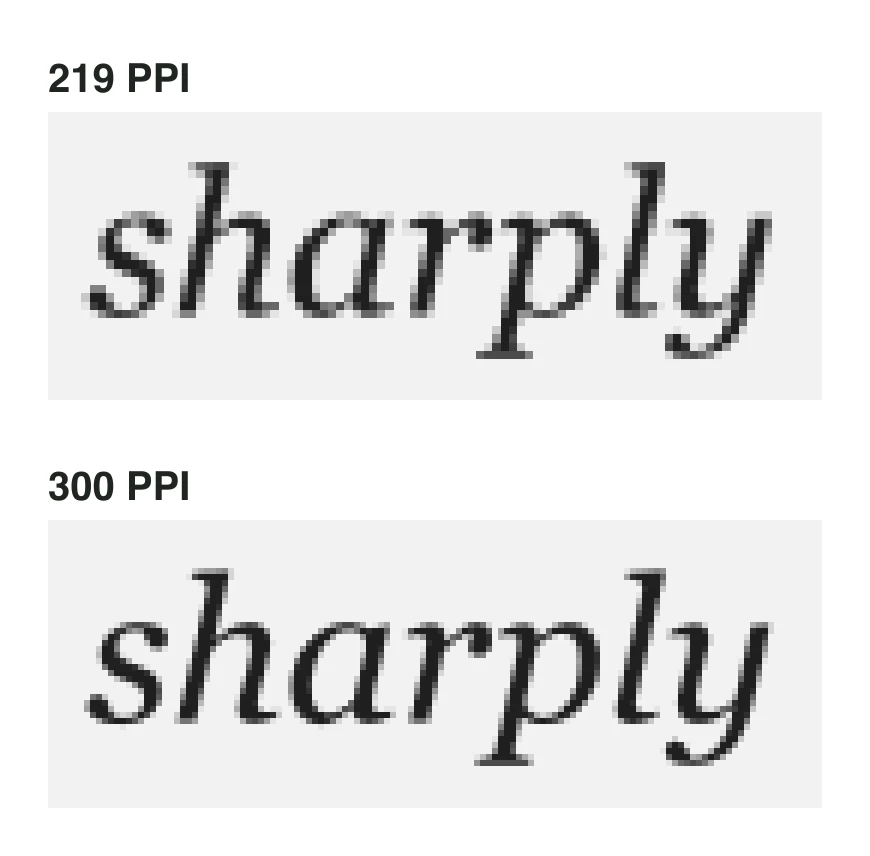
E-ink screens smooth letter edges with grey pixels (anti-aliasing), so 219 PPI text isn't jagged at normal sizes; it's slightly softer. The difference grows as text gets smaller, because each letter has fewer pixels to work with.
Small type: the real reason to choose Pro
On a pocket-sized screen, font size is a trade-off. Bigger text is easier to read, but fits fewer words, so you turn pages more often. Many pocket-reader owners settle on a smaller font than they'd use on a 6-inch Kindle.
This is where pixel density pays off. A font size describes the height of a line of type (the em), so you can count the pixels each screen has for it:
| Font size | Moov Lite (219 PPI) | Moov Pro (300 PPI) |
|---|---|---|
| 8 point | 24 pixels | 33 pixels |
| 10 point | 30 pixels | 42 pixels |
| 12 point | 36 pixels | 50 pixels |
Moov Pro at 8 point has more pixels per letter than Moov Lite at 10 point. Dropping from 10 to 8 point fits about 56% more text on each page, so on Moov Pro you can read noticeably smaller type, turn pages less often, and still get letters drawn with more detail than Lite gives you at a larger size.
The same goes for footnotes, superscripts, page numbers and the small text in menus, which all sit below your main font size.
PDFs, images and other scripts
PDFs. A PDF has a fixed page layout, usually designed for A4 or letter paper, so its text is tiny on a 4.5-inch screen. Both Moovs support PDFs, and Moov Pro adds enhanced PDF reflow and text formatting, and its 300 PPI keeps diagrams and small labels legible.
Images. Covers, maps, diagrams and illustrations keep more detail at 300 PPI, and the 16 grey levels of e-ink blend more smoothly when the pixels are smaller.
Chinese, Japanese and Korean text. Characters with many strokes need more pixels to stay distinct at small sizes, so readers of these languages benefit most from a higher PPI.
IPX8 water resistance
Moov Pro is rated IPX8 for continuous immersion beyond 1 metre, so a drop in the bath or the pool isn't the end of it. Moov Lite has no water-resistance rating, so keep it dry. As with any rated device, ratings are tested in fresh water: rinse after salt water or chlorine, and let the port dry before charging. More in our guide to water ratings.
Everything else is the same
- The same 110 × 66 × 6 mm, 75 g body, in white or black
- The same warm/cool front light with adjustable brightness and warmth
- The same touchscreen and left and right page-turn buttons
- The same 1,100 mAh battery and USB-C charging and file transfer
- The same 16 GB microSD card, replaceable up to 256 GB
- The same CrossPoint firmware, companion app and magnetic back
So the choice comes down to the screen, water and PDFs, not size, battery or software.
Which one should you buy?
Choose Moov Lite if you…
Pros
- Read novels at a medium or large font size
- Mostly read EPUBs, not PDFs
- Keep your reader away from water
- Want the lowest price: $99
Cons
- Small fonts look softer than on Pro
- No water-resistance rating
Choose Moov Pro if you…
Pros
- Like small fonts, to fit more on each page
- Read PDFs, diagrams or Chinese, Japanese or Korean text
- Read by the pool, in the bath or at the beach
- Want the sharpest screen you can fit in a pocket
Cons
- Costs $30 more
- If you read at large font sizes, the sharper screen matters less
How Moov Pro compares with other sharp e-readers
Every other 300 PPI e-reader we know of is phone-sized or larger, from the announced 5.84-inch PocketBook Q to the 6-inch Kindle and Kobo Clara BW. Among pocket readers, the sharpest screens before Moov Pro were the Xteink X3 (259 PPI) and Boox Picco (235 PPI). See 300 PPI e-readers explained for the full comparison, and every pocket e-reader compared.
- IKAWE Moov Pro (300 PPI)33.3 px
- Xteink X3 (259 PPI)28.8 px
- Boox Picco (235 PPI)26.1 px
- IKAWE Moov Lite (219 PPI)24.3 px
- Xteink X4 Pro (219 PPI)24.3 px
Calculated from each screen's published PPI.
Frequently asked questions
What's the difference between Moov Lite and Moov Pro?
Moov Pro has a sharper 300 PPI screen (against 219 PPI), IPX8 water resistance and enhanced PDF reflow, for $30 more. Size, weight, front light, battery, buttons, storage and software are the same.
Is 300 PPI noticeable on a 4.5-inch screen?
Yes, especially with small text. At 8 point, Moov Pro draws each letter with about 33 pixels of height against 24 on Moov Lite, so curves and thin strokes look smoother. At large font sizes the difference is smaller.
What resolution is Moov Pro's screen?
About 680 × 1,136 pixels on a 4.5-inch screen, which is 300 pixels per inch.
Is Moov Lite waterproof?
No. Moov Lite has no water-resistance rating. Moov Pro is rated IPX8.
Do Moov Lite and Moov Pro have the same battery?
Yes, both have a 1,100 mAh battery, charged over USB-C.
Can Moov read PDFs?
Yes. Both models support DRM-free EPUB, MOBI, TXT and PDF. Moov Pro adds enhanced PDF reflow and text formatting, which re-wraps a PDF's text to fit the screen at a readable size.
Are they the same size?
Yes. Both measure 110 × 66 × 6 mm and weigh 75 g.
Which Moov is better for reading in Chinese, Japanese or Korean?
Moov Pro. Characters with many strokes need more pixels to stay clear at small sizes, and 300 PPI gives each character almost twice as many pixels as 219 PPI.
Sources
- IKAWE Moov Lite and Moov Pro
- Viwoods: 300 PPI E Ink explained
- Kobo Clara BW product page
- TechRepublic: 2026 Kindle lineup and prices
- Xteink X3 product page
- Boox Picco product page
- Xteink X4 Pro product page
Specifications and prices checked on October 19, 2026. Products change; check the maker’s page before buying.